
Ingest tokens
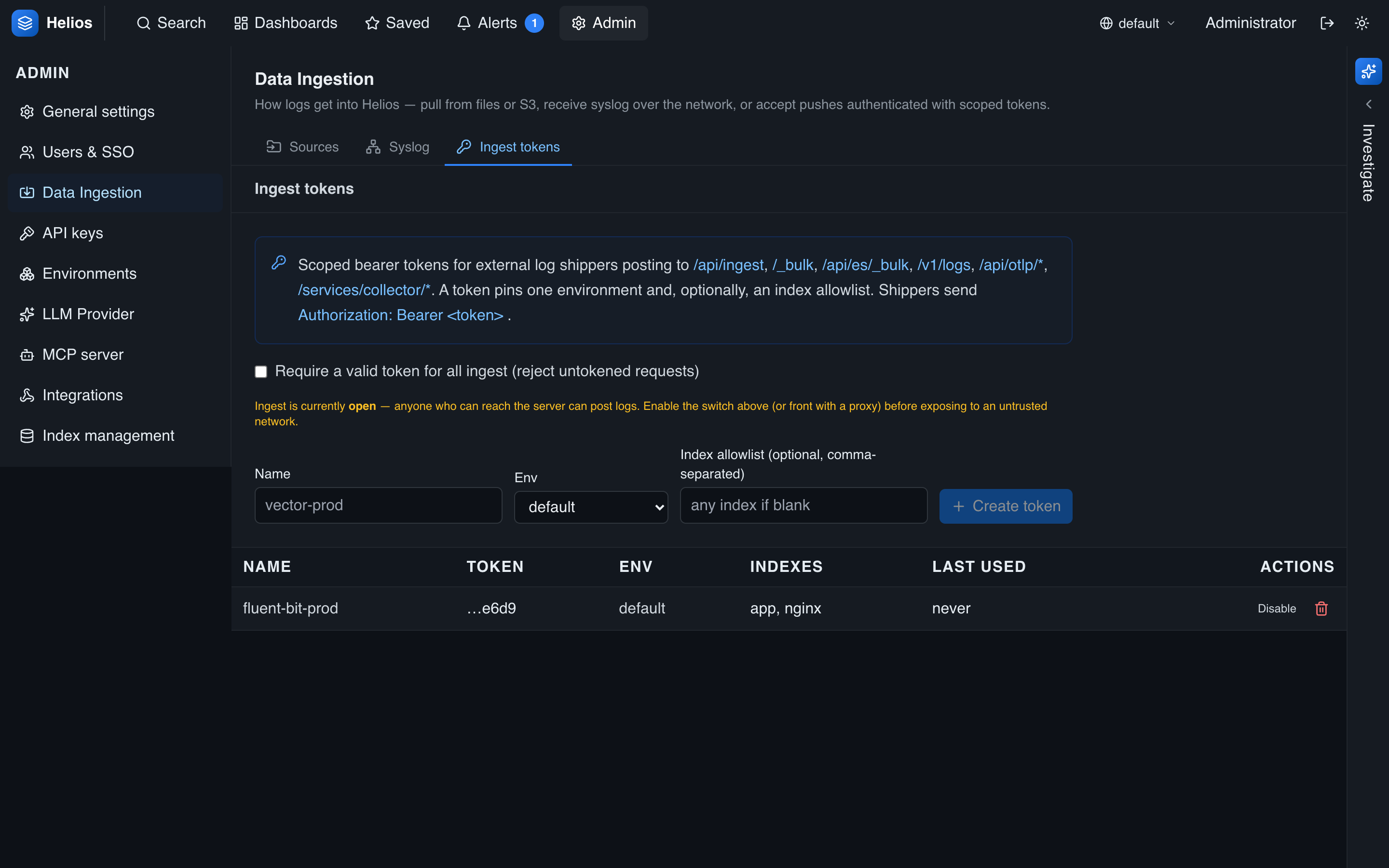
Ingest tokens authenticate and scope the shippers that push logs to HeliosLogs. Each token is pinned to one environment and, optionally, an allowlist of indexes — so a compromised shipper can only write where you intended.
Manage them under Admin → Data Ingestion → Tokens.
Ingest tokens vs. API keys
Ingest tokens authorize writing logs (/api/ingest, the shims, …) and are scoped to an env/index. API keys authorize reading via the REST API (search, aggregate, admin). Different jobs — use the right one.
Require authentication
By default ingestion is open — convenient for a local box. For anything exposed, turn on Require a valid token for all ingest (the switch on the Tokens tab). With it on, any ingest/shim request without a valid token is rejected with 401.
With require-auth off, a request with no token is accepted, but a request that presents an unknown bearer token is still 401 — so a misconfigured shipper fails loudly instead of writing to the wrong place.
Endpoint on/off is separate
Turning whole endpoint classes on or off (the HeliosLogs Ingest API, the compatibility APIs) is done on the Sources tab — see Pull sources. Require-auth and tokens live on the Tokens tab.
Creating a token
Create a token with:
- Name — a label (e.g.
fluent-bit-prod). - Environment — the workspace this token may write to. The token pins it; a request's
?env=orX-Helios-Envcannot override the token's env. - Indexes — an optional allowlist. Empty means any index within the env; otherwise writes to other indexes are rejected (and counted in
errors).
The secret is shown once at creation — copy it then. Afterward the list shows only the last four characters (…9ff7); there's no way to reveal it again, so rotate (delete + recreate) if it's lost. You can disable a token without deleting it, and delete it to revoke immediately.
Presenting a token
Send the token in the Authorization header. Three schemes are accepted:
| Scheme | Example | Notes |
|---|---|---|
| Bearer | Authorization: Bearer <token> | The default for most shippers. Strict — an unknown token is 401. |
| Splunk | Authorization: Splunk <token> | For HEC clients. Strict, like Bearer. |
| Basic | Authorization: Basic <base64(user:pass)> | The token may be the username or the password. Lenient — an unrecognized Basic credential falls through to the open path (when require-auth is off). |
curl -H "Authorization: Bearer <token>" \
  -X POST 'http://localhost:7300/api/ingest?index=app' \
  --data-binary @events.ndjson
See the shipper configs for where the header goes in Fluent Bit, Vector, and the OTel Collector.
Managing tokens via the API
Admins (or an admin API key) can manage tokens over REST:
| Method & path | Action |
|---|---|
GET /api/admin/ingest-tokens | List tokens (secrets masked) and the require-auth policy. |
POST /api/admin/ingest-tokens | Create a token; the full secret is returned once. |
PATCH /api/admin/ingest-tokens/:id | Enable/disable a token. |
DELETE /api/admin/ingest-tokens/:id | Revoke a token. |
PUT /api/admin/ingest-auth | Set the require / api-enabled / shims-enabled switches. |
See Security hardening for where ingest auth fits in a production setup.