
SAML SSO
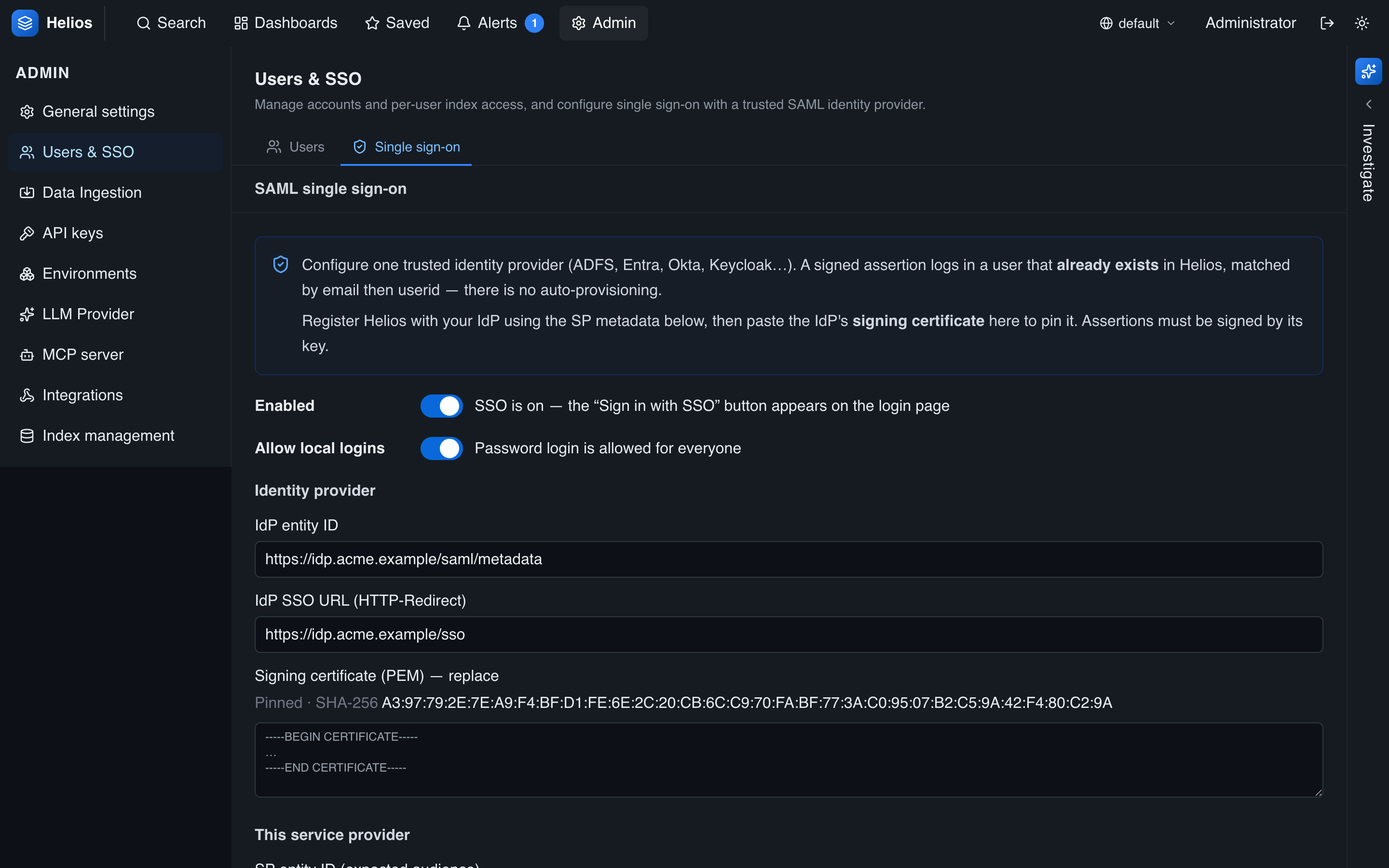
HeliosLogs supports SP-initiated SAML 2.0 single sign-on against one trusted identity provider. Configure it under Admin → Users → SSO.
How it works
- A user clicks the SSO button on the login page.
- HeliosLogs redirects them to your IdP to authenticate.
- The IdP POSTs a signed SAML assertion back to HeliosLogs's ACS URL.
- HeliosLogs verifies the signature (against your pinned certificate), the audience, and that the assertion hasn't been replayed, then matches the subject to a HeliosLogs user and issues a session.
Configuration
| Setting | Notes |
|---|---|
| Enabled | Turns SSO on; the login page shows the SSO button. |
| IdP entity ID | Your IdP's SAML entityID (informational). |
| IdP SSO URL | The HTTP-Redirect SSO endpoint users are sent to. |
| IdP signing certificate (PEM) | The pin — assertions must be signed by this key. (The UI never echoes it back; it shows a SHA-256 fingerprint and a "set" flag.) |
| SP entity ID | HeliosLogs's identifier, and the expected assertion audience. |
| ACS URL | Where the IdP POSTs the response: https://<helios>/api/auth/saml/acs. |
| Match attribute | Optional — a SAML attribute name to match users on instead of the <NameID>. |
| Button label | The login-page button text (default "Sign in with SSO"). |
| Disable local logins | SSO-only for standard users; admins keep password login as break-glass. |
HeliosLogs publishes SP metadata at GET /api/auth/saml/metadata — download it to register HeliosLogs with your IdP.
User matching (no auto-provisioning)
HeliosLogs is match-only: the SAML subject (matched by email, then userid) must already correspond to an existing HeliosLogs user. If there's no match, login fails — HeliosLogs does not create accounts just-in-time. So the workflow is:
- Create the user in HeliosLogs (matching the email/userid your IdP will assert).
- The user signs in via SSO.
Admin status and the data-access allowlist are managed in HeliosLogs, not derived from SAML attributes.
Break-glass
When local logins are disabled, admins can still sign in with a password at /login?local=1. Keep at least one admin password working so an IdP outage can't lock you out entirely.
Security
- The signing certificate is pinned — there's no trust-chain walk; assertions must be signed by exactly that key.
- The audience (SP entity ID) is checked.
- Assertions are checked for expiry and replay.
Troubleshooting
SSO failures show a generic error to the user; the specific reason (bad signature, audience mismatch, expired/replayed assertion, no matching user) is logged server-side — search the _helioslogs self-log for saml_* events.